How to Set Up Expiration Reminder Emails in Loyup
Why expiration reminders matter
Loyup can automatically email customers before their gift card credit expires, so fewer credits go unused and more customers come back to shop.
Customers often forget they have credit waiting, especially when it was earned months ago. A timely reminder turns a forgotten balance into a reason to return to your store. It also builds goodwill: customers feel looked after rather than surprised when a balance quietly disappears.
The whole setup takes less than a minute, and once it's on, Loyup handles every reminder for you.
How to turn on expiration reminders
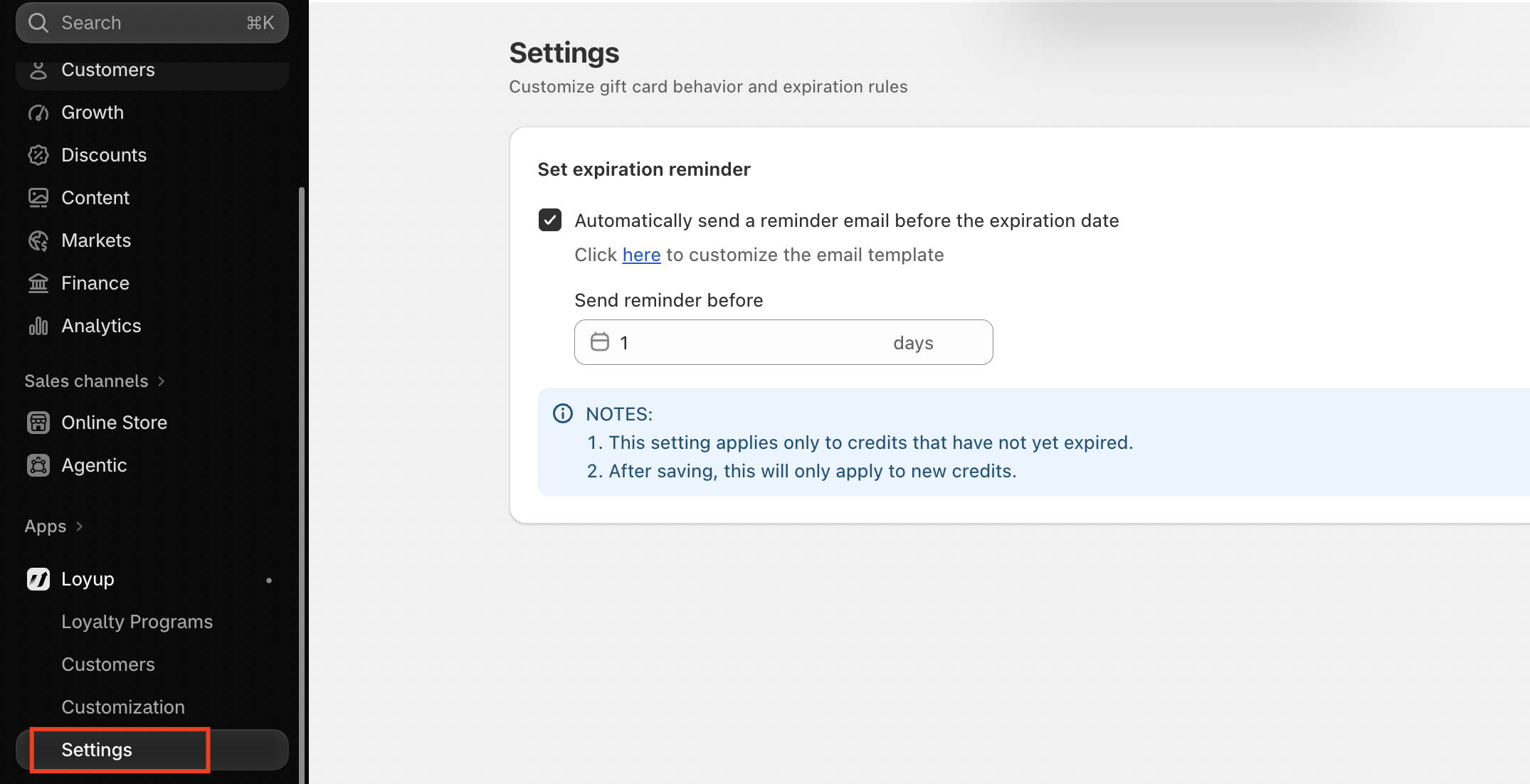
You'll find this option on the Loyup Settings page, under Set expiration reminder.
- In your Shopify admin, go to Apps > Loyup in the left sidebar.
- Click Settings, the last item under Loyup.
- In the Set expiration reminder section, tick Automatically send a reminder email before the expiration date.
- In Send reminder before, enter how many days ahead the email should go out. For example, enter 7 to remind customers one week before their credit expires.
- Save your changes.
That's it. From now on, Loyup sends the reminder automatically on the day you chose.
Which credits get a reminder
Reminders only go out for credits that are still active and were issued after you saved the setting.
- Already-expired credits are skipped. The reminder applies only to credits that have not yet expired.
- Existing credits aren't affected. Once you save, the setting applies to new credits only. Credits issued before you turned it on won't receive a reminder.
Because of this, it's best to turn reminders on early, ideally before you start issuing gift cards or store credit.
Choosing the right timing
For most stores, 7 days before expiry is a good default: enough time to plan a purchase, close enough to feel urgent.
| Days before expiry | Best for |
|---|---|
| 1–3 days | Last-call urgency; quick, low-priced purchases |
| 7 days | Most stores; balances customers can spend on a regular order |
| 14–30 days | Higher-value items customers need time to decide on |
Frequently asked questions
Can I change the number of days later? Yes. Update the value in Send reminder before and save. The new timing applies to credits issued after you save.
Can I edit what the email says? Yes. Please open the email template and adjust the wording and design.
How do I stop sending reminders? Untick Automatically send a reminder email before the expiration date and save your changes.
If you have any concerns or questions, please do not hesitate to contact us at [email protected]